DuckDB as Aggregation Engine in Data Pipelines
Introduction
A quick account on using DuckDB in HPC / High-throughput systems pipelines with a simple IPC (ZeroMQ in our case!) backend.
DuckDB
DuckDB is a lightweight, high-performance analytical database designed to run inside your application (in-memory)
Why DuckDB?
- Columnar, vectorized engine matches for NumPy/Arrow batch pipeline.
- Queries Arrow data directly with minimal copying and Python overhead.
- Executes aggregations efficiently using optimized SQL execution.
- Built for high-throughput analytical workloads.
File Formats - Parquet
We will be using the Parquet file format for processing efficiency, which will allow us to take advantage of advanced features like Row Groups and Zero-Copy abstraction.
Let’s Crunch Some Data!
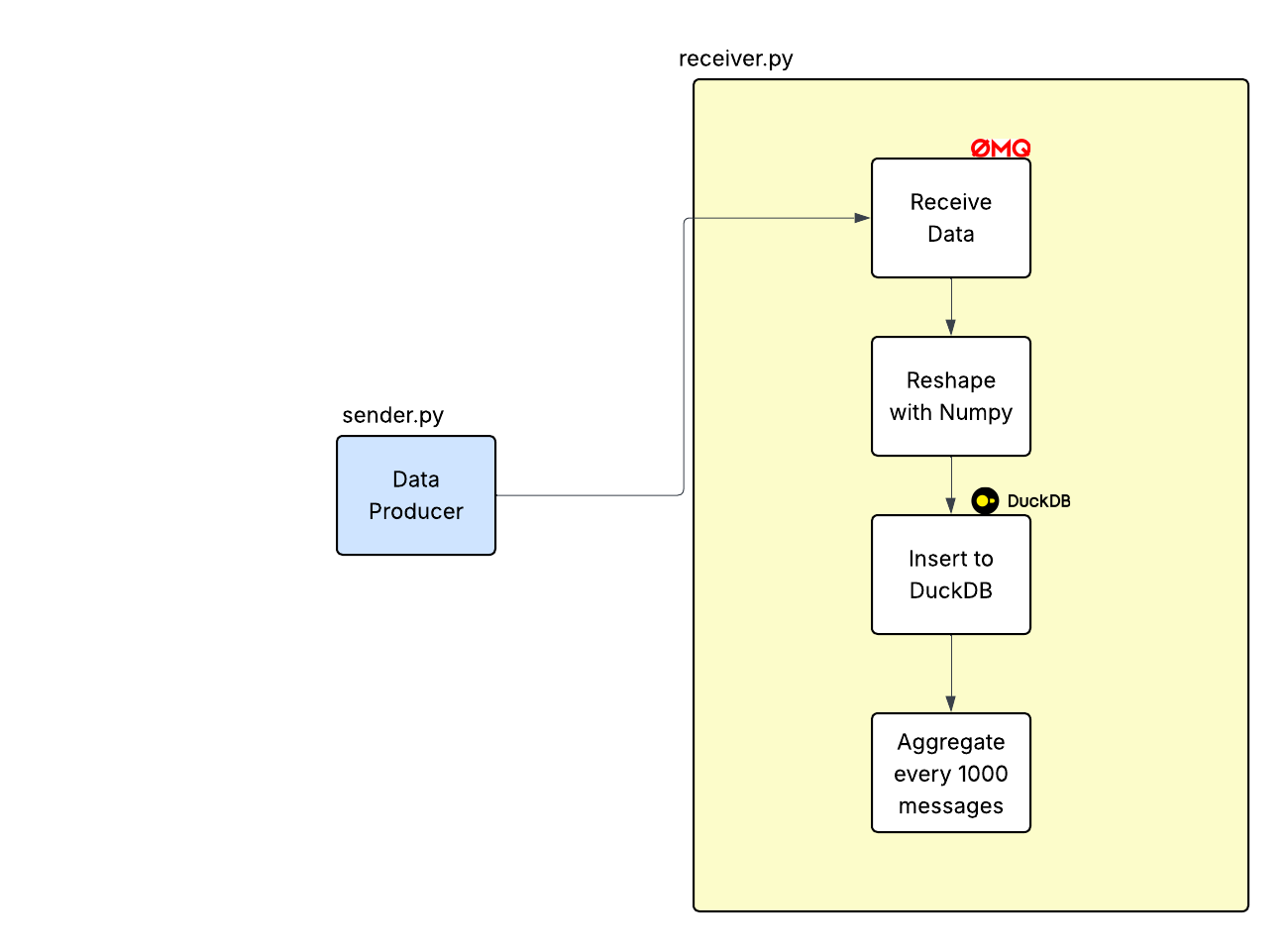
The layout of our pipeline is as follows:
sender.py- This generates data and sends it toreceiver.pythrough ZMQ socketreceiver.py- This receives data, inserts data into duckdb and generates aggrregated average.receiver_pd.py- pandas based reference implementation.
Pipeline & Setup
We are going to send a data chunk (message) with shape (R, 2) rows every N seconds to a receiver program.
Our sender.py program is as follows:
 1# sender.py
 2import zmq
 3import numpy as np
 4import time
 5import argparse
 6
 7
 8def main(mps: int, rows: int):
 9    ctx = zmq.Context()
10    socket = ctx.socket(zmq.PUSH)
11    socket.connect("ipc://@simple-stream")
12
13    interval = 1.0 / mps
14
15    while True:
16        # create batch (rows x 2 columns)
17        ts = np.full((rows, 1), time.time(), dtype=np.float64)
18        val = np.random.rand(rows, 1)
19
20        batch = np.hstack([ts, val])  # shape (rows, 2)
21        # print("sending batch:", batch)
22
23        # send as raw bytes
24        socket.send_multipart(
25            [
26                batch.astype(np.float64, order="F").tobytes(),
27                str(rows).encode(),
28                b"2",  # number of columns
29            ]
30        )
31
32        time.sleep(interval)
33
34
35if __name__ == "__main__":
36    parser = argparse.ArgumentParser()
37    parser.add_argument("--mps", type=int, default=10)
38    parser.add_argument("--rows", type=int, default=1000)
39    args = parser.parse_args()
40
41 main(args.mps, args.rows)- In
ln 16, we create 1000 rows of random float64 values along with the current timestamp. ln 24sends out the message to the ZeroMQ socket (read/received byreceiver.py)
let’s look at how receiver.py works:
 1# receiver.py
 2import zmq
 3import numpy as np
 4import duckdb
 5import pyarrow as pa
 6import time
 7import json
 8
 9def main():
10    ctx = zmq.Context()
11    socket = ctx.socket(zmq.PULL)
12    socket.bind("ipc://@simple-stream")
13
14    conn = duckdb.connect()
15    conn.execute("""
16        CREATE TABLE data (
17            ts DOUBLE,
18            value DOUBLE
19        )
20    """)
21
22    MESSAGE_THRESHOLD = 100
23
24    count = 0
25    total_count = 0
26
27    start_t = time.perf_counter()
28
29    while True:
30        data, r, c = socket.recv_multipart()
31        r, c = int(r.decode()), int(c.decode())
32        count += 1
33
34        # read as Fortran order
35        arr = np.frombuffer(memoryview(data), dtype=np.float64).reshape(r, c, order="F")
36
37        # ---- column views ----
38        ts_col = arr[:, 0]
39        val_col = arr[:, 1]
40
41        table = pa.Table.from_arrays(
42            [
43                pa.array(ts_col),
44                pa.array(val_col),
45            ],
46            names=["ts", "value"]
47        )
48
49        conn.register("incoming", table)
50
51        conn.execute("""
52            INSERT INTO data
53            SELECT * FROM incoming
54        """)
55
56        if count >= MESSAGE_THRESHOLD:
57            result = conn.execute("""
58                    SELECT COUNT(*), AVG(value)
59                    FROM data
60                """).fetchall()
61
62            bench_message = {"time_s": time.perf_counter() - start_t, "total_count": total_count}
63            print(json.dumps(bench_message))
64
65            total_count += count
66            count = 0
67
68            if total_count >= 1_000:
69                break
70
71if __name__ == "__main__":
72 main()- In
ln 15, we create a table to store the data that we are going to receive from the socket. - Next, in
ln 30, we receive the message and reconstruct the data inln 35 ln 41- create a PyArrow table and insert that into the DuckDB table that we created earlier.
Column Major / Fortran Order Layout - Zero Copy
When we store the data in Column-Major Order/Fortran Order, a Pyarrow table can be created without modifying (copying) the underlying NumPy buffer. This is critical in High througput pipelines where CPU can be a potential bottleneck.
Let’s look at an example:
$$ \begin{array}{c c} \begin{bmatrix} 1 & 2 \\ 3 & 4 \end{bmatrix} & \begin{bmatrix} 1 & 3 \\ 2 & 4 \end{bmatrix} \\ \mathrm{C\ Order} & \mathrm{(F)ortran\ Order} \end{array} $$
Recall how we are reading the rows in every message:
ts_col = arr[:, 0]
val_col = arr[:, 1]
This index takes all rows of column 0 (timestamp) and column 1 (value), ts_col and val_col can be interpreted as pyarrow array with the same memory buffer underneath, i.e., zero copy.
Benchmarks
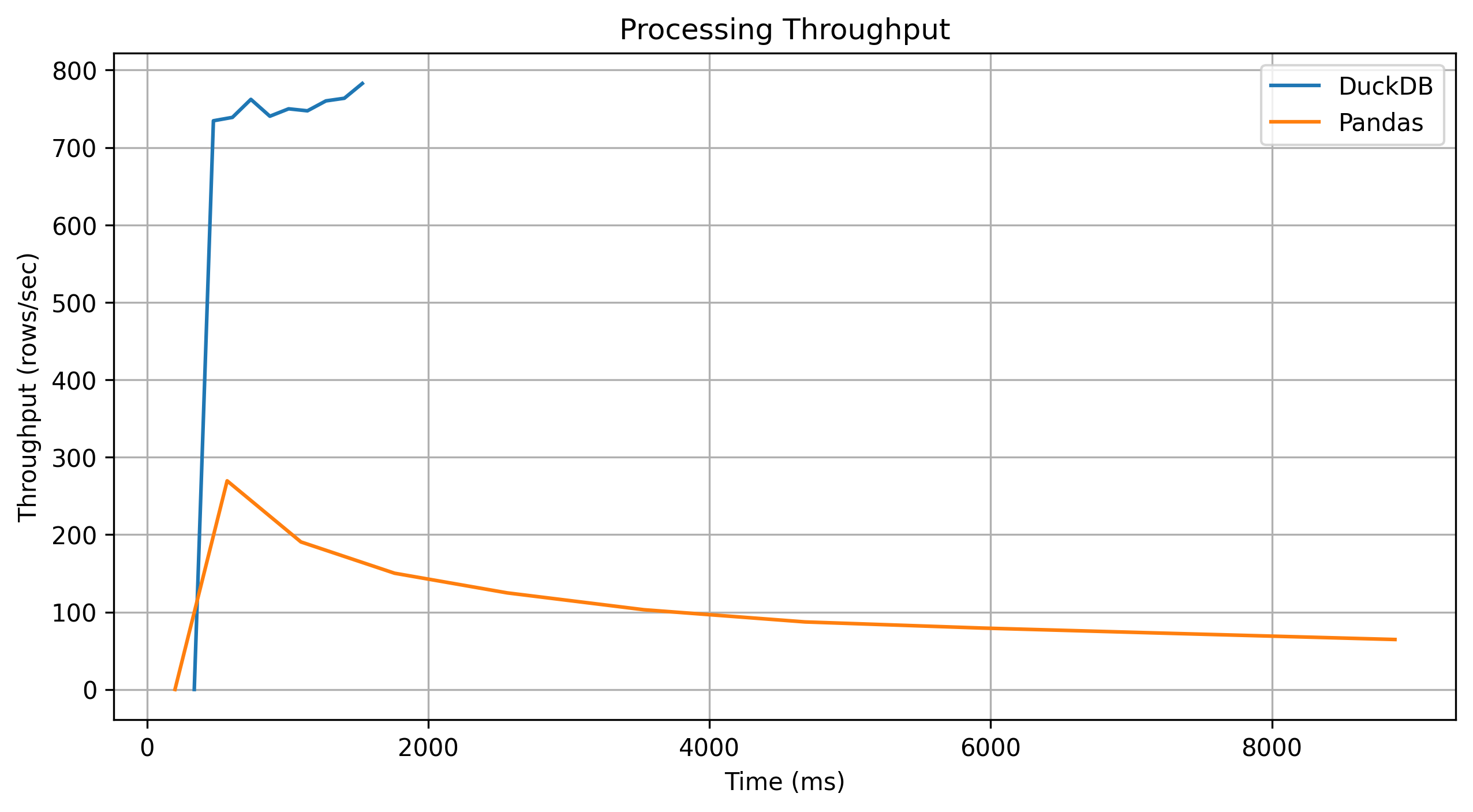
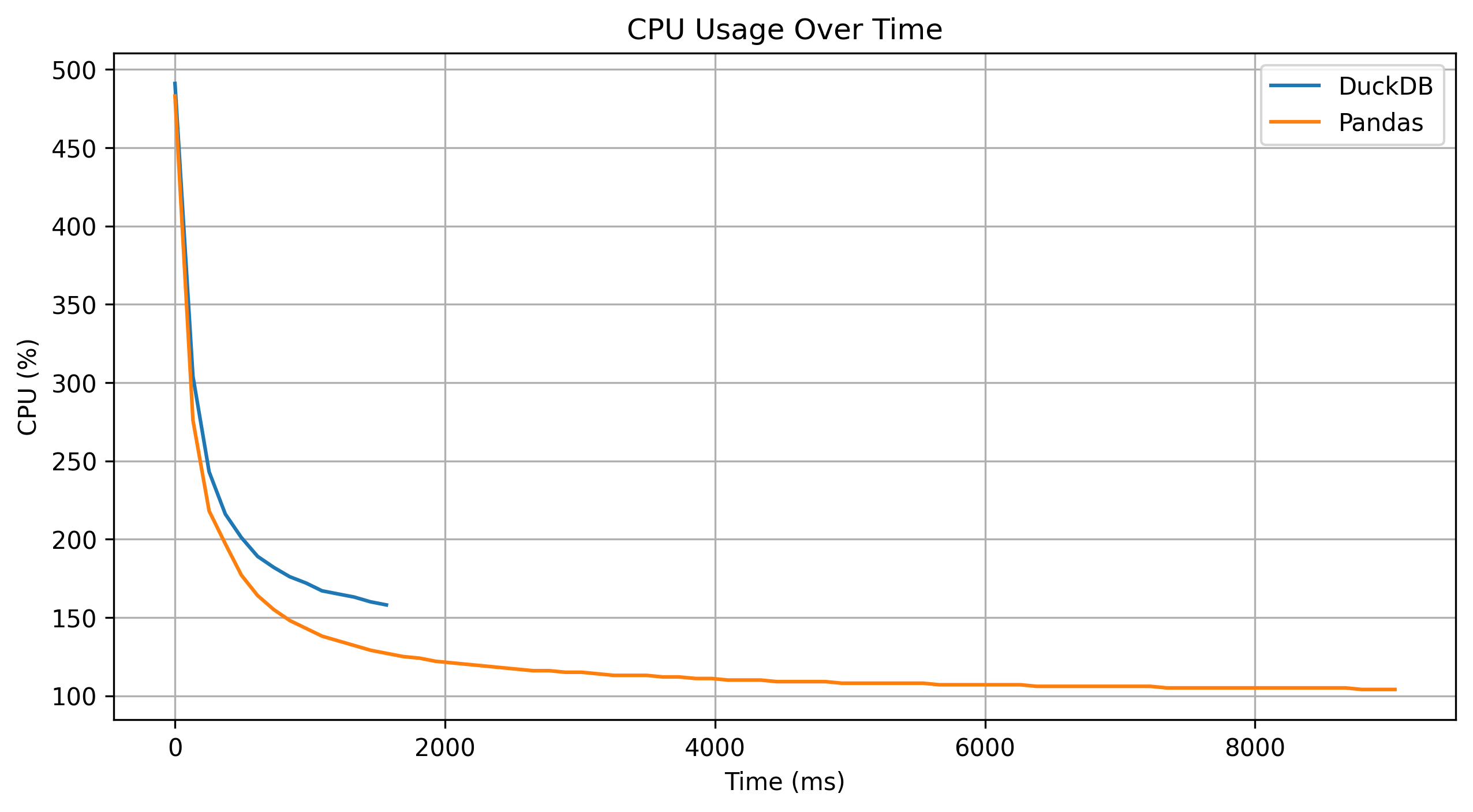
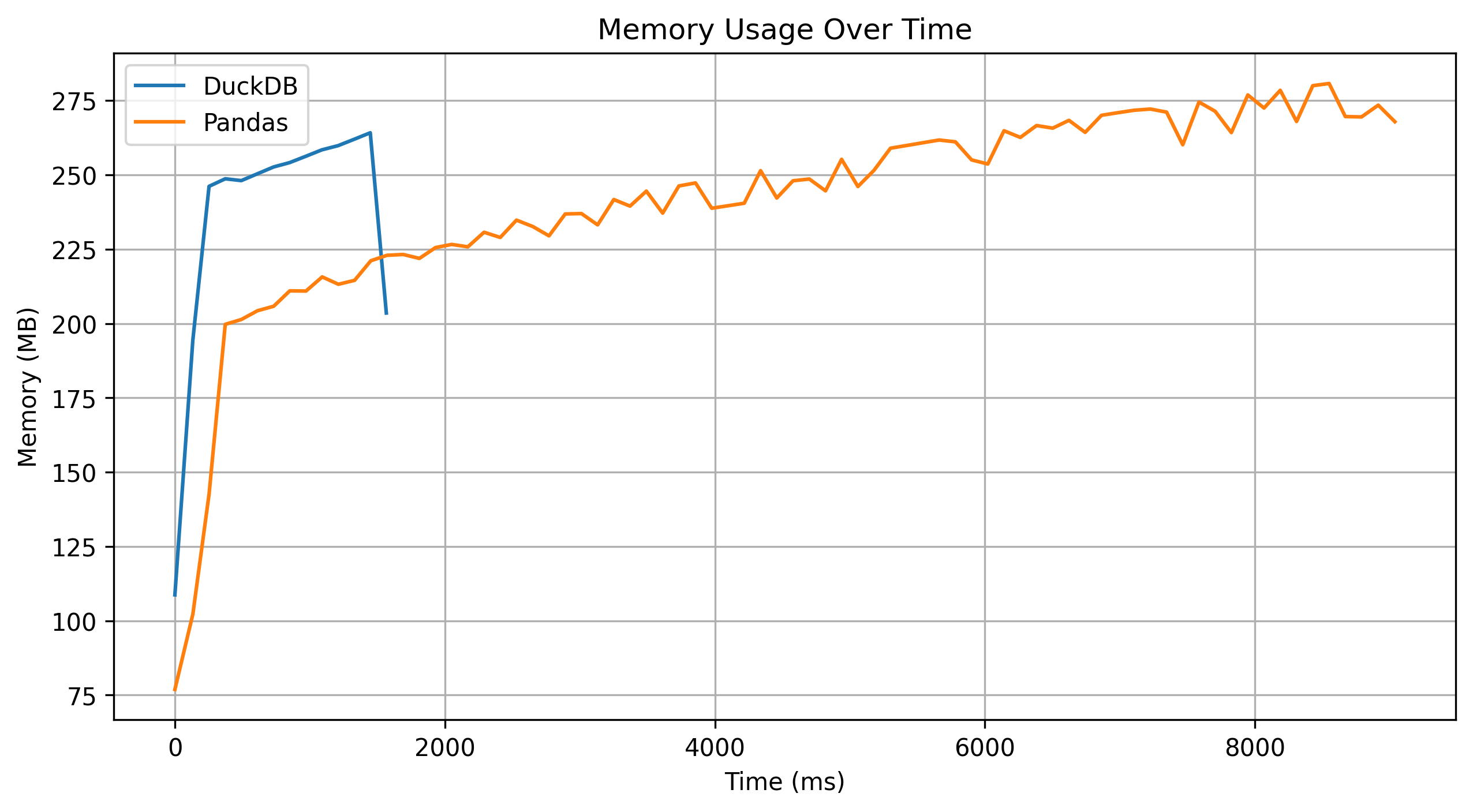
DuckDB aggregation is about 8x Faster than reference pandas implementation.
Here are some interesting graph metrics:
Conclusion
DuckDB is an efficient analytics engine to use in a simple pipeline that has to deal with high throughput of data.